

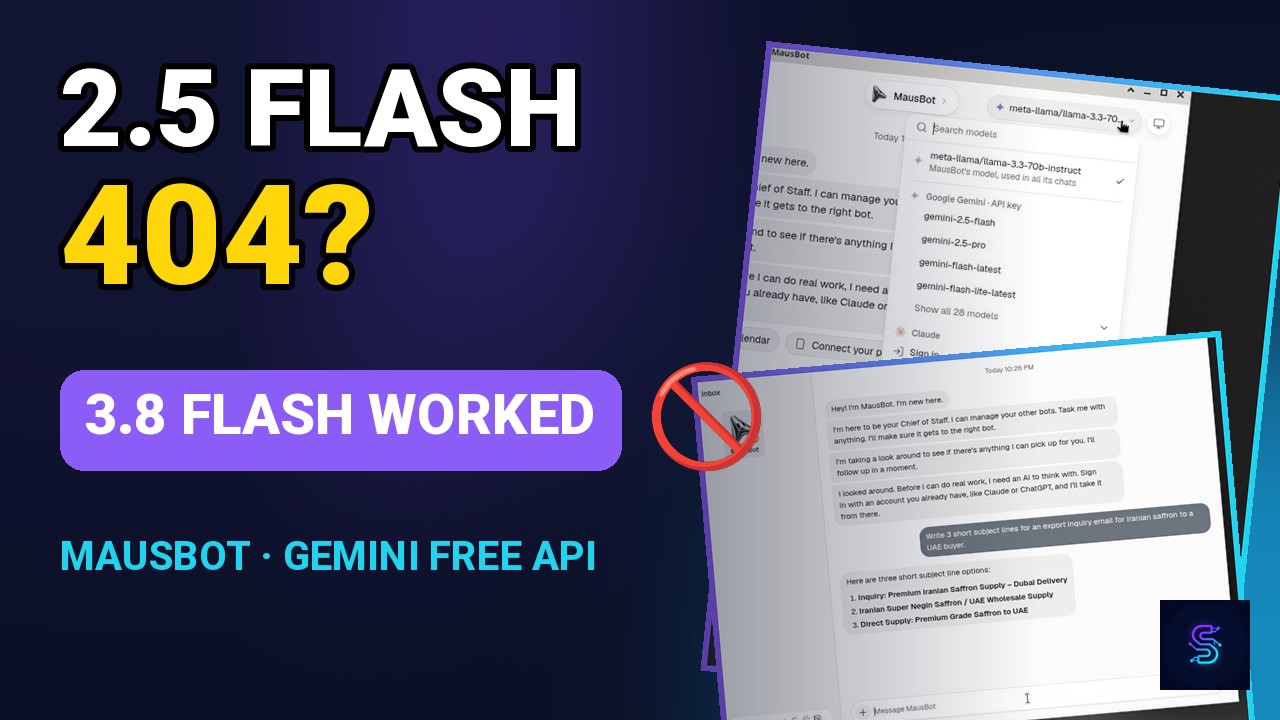
Short answer: On 12 November 2026 (21 Aban), Asia/Tehran, we connected a Google AI Studio API key to MausBot 0.1.154 (official OpenMausBot x86_64 AppImage; SHA-256 matched the release SUMS file). The in-app path was Settings → AI → More servers → Fill in Google Gemini. Off-camera, gemini-2.5-flash and gemini-2.5-flash-lite both returned 404 with the message that the model is no longer available to new users. gemini-3.8-flash returned 200 in about 4.2 seconds (272 total tokens, about 241 of them thinking). In the GUI, the same model answered a short prompt in about 5 seconds. We did not open a billing page, and we do not claim a $0 invoice or that the setup is completely free.
These figures are from that 12 November run, not a new test on the day this article was published. Official Google and MausBot pages were re-checked when the article went live; we did not repeat the API calls or GUI walkthrough. MausBot itself is a free Apache 2.0 desktop app; model usage is billed by the provider.
The video above is the English walkthrough that goes with this write-up: I Connected Gemini’s Free API to MausBot — 3.8-Flash Worked, 2.5-Flash 404’d for New Users. This article is the written companion, with the figures and sources from the same run. Channel: sophraiAI on YouTube.
A public social post about this setup can make it sound like a completely free desktop agent. That is not what we can honestly say. Below is what we actually ran on 12 November 2026, what failed, what worked, and which official caveats still apply.
What MausBot is (and is not)
MausBot (open-source as OpenMausBot) is a free desktop app under the Apache 2.0 licence. It can talk to several model providers. The app being free does not make the models free. Usage, quotas and any invoice are the provider’s.
We used the official OpenMausBot 0.1.154 x86_64 AppImage, dated to the v0.1.154 GitHub release. The SHA-256 of the file we ran matched the release SUMS file. In the app, the About / This app line also showed 0.1.154.
MausBot has two different Gemini paths. One is an AI Studio API key, added as an OpenAI-compatible server. The other is Google Gemini (Antigravity) sign-in. We only used the API-key path. We did not click Sign in with Google, and we did not test Antigravity.
What we actually did on 12 November 2026 (21 Aban)
The GUI walkthrough was recorded the same day. At a high level: create a Chief of Staff, open Settings, then AI, search for “model servers”, choose the OpenAI-compatible API key flow, open More servers, choose Fill in Google Gemini, paste an API key (masked on screen; the field is covered in the published video), add the server, pick gemini-3.8-flash, send one live prompt, and wait for one live reply — about five seconds in the recording.
That “Fill in Google Gemini” control is what the 0.1.154 app actually showed. The official model-providers doc did not document this button on 12 November 2026, and it still did not when we re-read the page for this article. The preset itself is discussed in OpenMausBot pull request 4264.
The preset base URL in the app was https://generativelanguage.googleapis.com/v1beta/openai — no trailing slash in the app. Google’s OpenAI-compatibility docs use a trailing slash at the same origin. We used the URL the app filled in.
Off-camera we made four HTTP calls only, then stopped: GET /models, then POST for gemini-2.5-flash, gemini-2.5-flash-lite, and gemini-3.8-flash. The first of those POSTs started around 22:29 Asia/Tehran on 12 November 2026. The project’s billing status was recorded as unknown; API responses were not treated as proof of Free versus Paid billing.
The 2.5-Flash catch, and what 3.8-Flash actually returned
In the MausBot picker, the group “Google Gemini · API key” still listed gemini-2.5-flash, 2.5-pro, flash-latest, flash-lite-latest, and a “Show all 28 models” control. Listing a model is not the same as being able to call it.
| Call (12 Nov 2026, off-camera) | Result |
|---|---|
GET /models at the OpenAI-compatible base URL | 200 in 238.4 ms; 64 models, including 2.5 Flash and 3.8 Flash |
POST gemini-2.5-flash (max_tokens 256) | 404 in 276.8 ms: “no longer available to new users”; recommends gemini-3.8-flash |
POST gemini-2.5-flash-lite (max_tokens 256) | 404 in 302.2 ms: “no longer available to new users”; recommends gemini-3.5-flash-lite |
POST gemini-3.8-flash (max_tokens 256) | 200 in 4,215.8 ms; usage 20 / 11 / 272 tokens (about 241 thinking); finish_reason was length |
The 3.8-Flash HTTP call is easy to misread. The usage object was prompt_tokens 20, completion_tokens 11, total_tokens 272. The leftover — 272 − 20 − 11 = 241 — is the thinking budget. Because max_tokens was 256 and thinking consumed most of it, the visible completion was cut off after a short lead-in (“Here are 3 short, high-impact subject lines”). That truncated HTTP body is not the GUI answer in the video.
The live GUI prompt asked for three subject lines for an export inquiry about Iranian saffron to a UAE buyer. The reply appeared in about five seconds (the message is visible at roughly 146 seconds in the raw recording, the reply at about 151 seconds — about 5 seconds, not 8). The three lines were:
- Inquiry: Premium Iranian Saffron Supply – Dubai Delivery
- Iranian Super Negin Saffron / UAE Wholesale Supply
- Direct Supply: Premium Grade Saffron to UAE
We are describing that one short prompt, not a production workflow, a long agent run, or a claim about quality over time.
What “free” means here — and what we are not claiming
On 12 November 2026, Google’s Gemini API pricing page listed gemini-3.8-flash as free of charge on the Free tier for input and output, including thinking tokens. We re-read that official page when this article was published; it still listed Free-tier input and output (including thinking tokens) as free of charge. That is a pricing-table statement, not a screenshot of our bill.
We did not open the billing page, we did not capture an invoice, and we do not claim a $0 invoice or that this is “completely free.” A free-tier model can still sit inside a project whose billing status you have not checked. Ours was unknown. Limits, region rules and the unpaid-services terms still apply, and listed prices can change.
Google’s rate-limits documentation says limits are applied per project, not per API key. Requests-per-day quotas reset at midnight Pacific time. Active limits are shown in Google AI Studio. Specified rate limits are not guaranteed, and actual capacity may vary. We did not exhaust a rate limit in this run, and we are not publishing a full RPM/TPM/RPD table of our own — read the live view in AI Studio.
Unpaid-quota privacy, and a region fact
The Gemini API Additional Terms are effective 23 March 2026. Unpaid Services include direct use of Google AI Studio and unpaid quota on the Gemini API. When you use Unpaid Services, Google uses the content you submit and the generated responses to provide, improve and develop Google products and services and machine learning technologies, consistent with its Privacy Policy.
The same terms say that, to help with quality and improve products, human reviewers may read, annotate and process your API input and output. Google says it disconnects that data from your Google Account, API key and Cloud project before reviewers see or annotate it. The terms also say: do not submit sensitive, confidential or personal information to the Unpaid Services. Read the current document before you paste real customer data into a free-tier key.
One more official fact, stated only as a fact: Iran is not on Google’s official available-regions list for Google AI Studio and the Gemini API. We checked the available-regions page on 12 November 2026 and again when this article was published; Iran was not listed either time. The additional terms say you may only access the services within an available region. This article does not go beyond that.
What we did not run
- Google Gemini (Antigravity) Sign in with Google.
- Paid Gemini models, a billing-account upgrade, or any invoice screenshot.
- A public free-tier RPM/TPM/RPD table copied out as if it were guaranteed capacity.
- Exhausting a rate limit.
- Any region-bypass test.
- A claim that the project’s invoice is $0.
Who this suits
This is useful if you already want a local desktop agent and you have a Google AI Studio key, you can read the current model list and error messages (a picker entry can 404), and you are willing to treat unpaid quota as what the terms say it is — including privacy and per-project limits. It is a poor fit if you need a guaranteed $0 bill, a model that will stay on the free tier indefinitely, or a path that the official MausBot model-providers doc already documents end to end.
If you are connecting models to shared n8n workflows rather than a personal desktop app, estimate volume with our n8n Cost & Hosting Planner, check exported workflows in the n8n Workflow Auditor for exposed keys and open webhooks, and compare subscriptions in the AI SaaS Pricing Comparison.
Sources used for this article
Run notes and HTTP evidence are from 12 November 2026, Asia/Tehran. Official pages below were first checked that day and re-read when this article was published. We did not repeat the live API calls or the GUI walkthrough for publication.
- MausBot site and download
- MausBot model providers docs and Antigravity path
- OpenMausBot on GitHub (Apache 2.0), release v0.1.154, and PR 4264
- Google AI Studio API keys and Gemini OpenAI compatibility
- Gemini API pricing, rate limits, and AI Studio rate-limit view
- Available regions and Gemini Additional Terms (effective 23 March 2026)
FAQ
Is MausBot itself free?
MausBot (OpenMausBot) is a free, Apache 2.0 desktop app. The app licence is not a model subscription. Tokens, rate limits and any invoice come from the provider you connect, such as Google. See mausbot.com and the GitHub repository.
Did gemini-2.5-flash work in this setup?
Not for us, on 12 November 2026. The model still appeared in MausBot’s picker and in GET /models (64 models). A POST to gemini-2.5-flash returned 404 in 276.8 ms, saying the model is no longer available to new users and recommending gemini-3.8-flash. gemini-2.5-flash-lite also returned 404 (302.2 ms) and recommended gemini-3.5-flash-lite. We did not re-test those calls when this article was published.
Which model actually replied?
gemini-3.8-flash. Off-camera, a POST returned HTTP 200 in 4,215.8 ms with 20 prompt tokens, 11 completion tokens and 272 total tokens (about 241 thinking). That HTTP response finished with finish_reason length because max_tokens was 256 and thinking used most of the budget, so the text was truncated. Separately, in the MausBot GUI, the same model answered a prompt for three saffron-export subject lines in about five seconds with a complete reply.
Is this completely free? Do you have a $0 invoice?
No. We do not claim the setup is completely free, and we do not have a $0 invoice. The project’s billing status was unknown; we did not open a billing page. Google’s official pricing page listed gemini-3.8-flash as free of charge on the Free tier on 12 November 2026, and still did when we re-read that page for this article. Free-tier access is still subject to per-project rate limits, region availability, and the unpaid-services terms.
Where is the Gemini API key setup in MausBot 0.1.154?
In the copy we ran: Settings → AI, search for “model servers”, open the OpenAI-compatible API key flow, then More servers → Fill in Google Gemini, paste the key, add the server, and pick a model. The official model-providers doc did not document that “Fill in Google Gemini” button when we checked it on 12 November or when this article was published. There is a separate Google Gemini (Antigravity) sign-in path; we did not use it.
What should I know about privacy on the unpaid Gemini API?
Google’s Gemini API Additional Terms (effective 23 March 2026) treat unpaid quota, including Google AI Studio and unpaid Gemini API quota, as Unpaid Services. Google may use the content you submit and the generated responses to provide, improve and develop Google products and services. To help with quality and improve products, human reviewers may read, annotate and process your API input and output. Google says it disconnects that data from your Google Account, API key and Cloud project before reviewers see it. Do not submit sensitive, confidential or personal information to the Unpaid Services. Read the current terms.
Is the Gemini API available in Iran?
Iran is not on Google’s official available-regions list for Google AI Studio and the Gemini API (the list was checked on 12 November 2026 and again against the official page when this article was published). Google’s additional terms say you may only access the services within an available region. This article states that fact only.
Did you sign in with Google Gemini (Antigravity)?
No. MausBot has two different Gemini paths: an AI Studio API key (the path we used) and Google Gemini (Antigravity) sign-in. We did not run the Antigravity sign-in, paid Gemini models, a billing-account upgrade, or any invoice screenshot.
